Command Center

Solo project Designed and developed by me

A clean, modern productivity dashboard built with React and Vite. It brings everyday tools into one compact workspace, from notes and tasks to calculator history, focus sessions, QR codes, password generation, weather planning, shortcuts, and a small 2248-style puzzle board.

React Vite Framer Motion Lucide Icons CSS Grid Local Storage
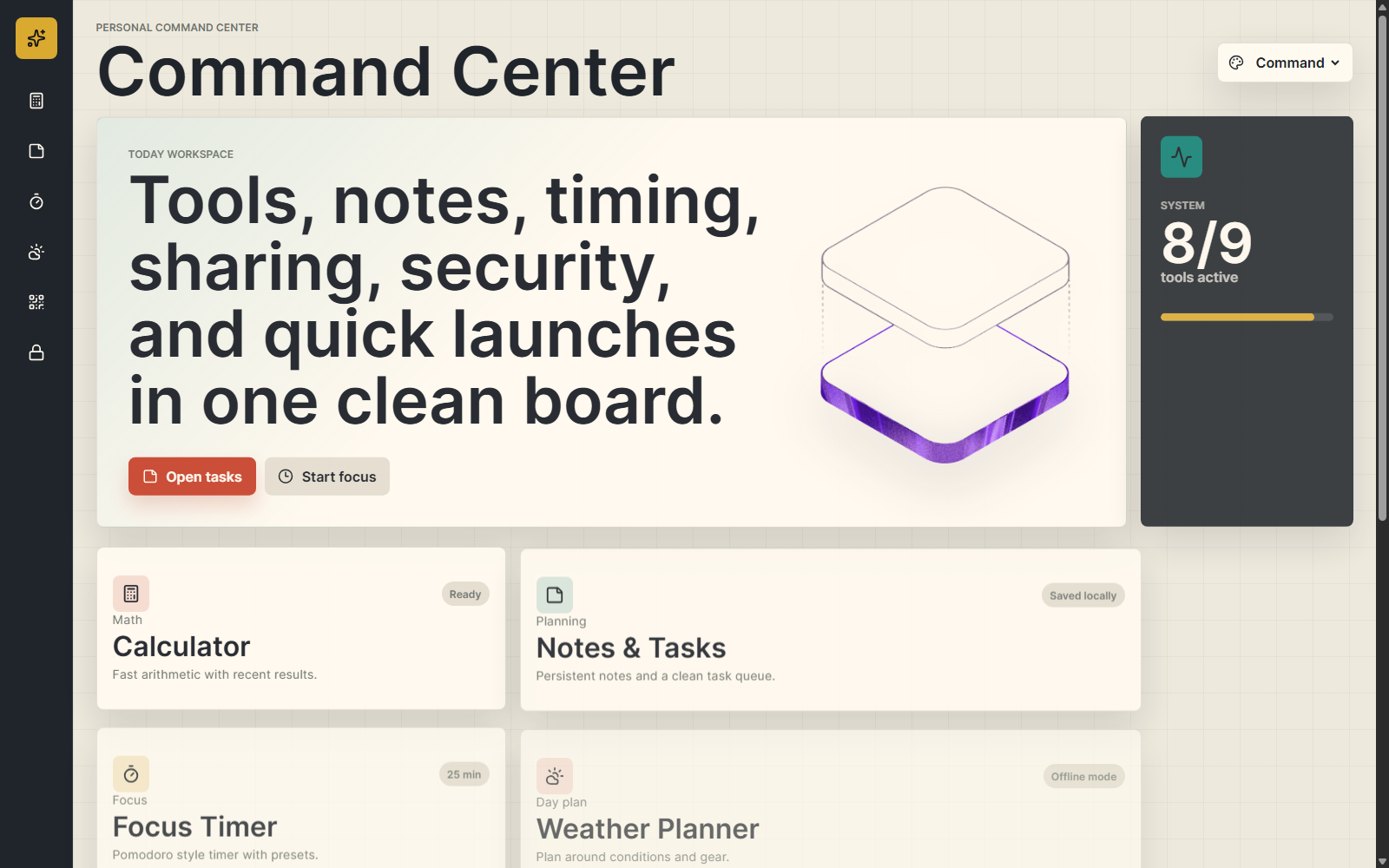
Command Center productivity dashboard mockup

Project Overview

The Goal

The goal was to create a practical personal workspace that brings multiple everyday tools into one simple interface. Instead of making a single-purpose app, I wanted Command Center to feel like a real digital control panel: polished, responsive, compact, and easy to use.

The project focuses on helping users quickly access useful utilities without switching between separate apps, while still keeping the dashboard visually calm and organized.

The Solution

The app combines a calculator with history, notes and tasks, a focus timer, weather planning, QR code generation, password generation, map search shortcuts, music/focus launch options, and a small playable 2248-style puzzle board.

These tools are organized into a responsive dashboard layout with clear spacing, icon-based navigation, visual themes, and local browser storage for persistent notes, tasks, and calculation history.

Project Details

Timeline

Project Type

Front-end productivity dashboard

Focus

Everyday tools, responsive UI, and polished dashboard design

Repository

Hosted on GitHub Pages

Ownership

Solo project. I designed and developed the full application.

Technical Details

Architecture

React and Vite front-end application using component state, local browser storage, responsive CSS Grid layouts, animations, icons, and client-side utility logic.

Technologies

React Vite Framer Motion Lucide Icons QR Code Package Browser Crypto API

Skills Applied

Product Skills

  • UI/UX planning
  • Responsive interface design
  • Dashboard information hierarchy

Technical Skills

  • Component-based development
  • State handling with React hooks
  • Client-side persistence and utility logic

Key Features

Tools Dashboard

Calculator, notes, tasks, focus timer, weather, QR codes, passwords, maps, music, and puzzle tools sit in one organized workspace.

Local Persistence

Notes, tasks, and calculator history are saved locally in the browser so the workspace stays useful between sessions.

Theme System

Command, Light Desk, and Night Ops themes give the dashboard different moods while keeping the layout consistent.

Secure Utilities

The password generator uses the browser crypto API, while QR code generation and shortcuts run fully on the client side.

Development Process

1. Concept & Layout

Planned a compact command-console style dashboard that could hold many small tools without feeling crowded.

2. Component Build

Built the utilities as React components with hooks for state, interaction, and persistent browser storage.

3. Interaction Polish

Added responsive CSS Grid layouts, Framer Motion animations, icon navigation, and multiple visual themes.

4. Deployment

Prepared and deployed the front-end project through GitHub Pages as a complete interactive portfolio piece.

Key Takeaways

"This project helped me practice turning a broad idea into a complete interactive product, balancing useful tools with a dashboard interface that still feels clean and presentable."

Product Insight

Practical dashboard design

"Building Command Center improved my skills in component-based development, responsive layouts, state handling, external packages, and front-end deployment."

Technical Growth

React + Vite + client-side utilities

Explore More Projects